How does phone GPS tracking work in TTMS Fleet Mini?
During an active trip, Fleet Mini can use permitted phone location signals to support map visibility, route progress, geofence arrivals and operational alerts. Phone-derived location and motion values are estimates and do not replace certified ELD records.

TTMS FLEET MINI
Trip visibility,
in your pocket.
Use phone-based trip location signals, route context, geofence arrivals and GPS-loss alerts to improve active-load visibility for small fleets.
Explore the app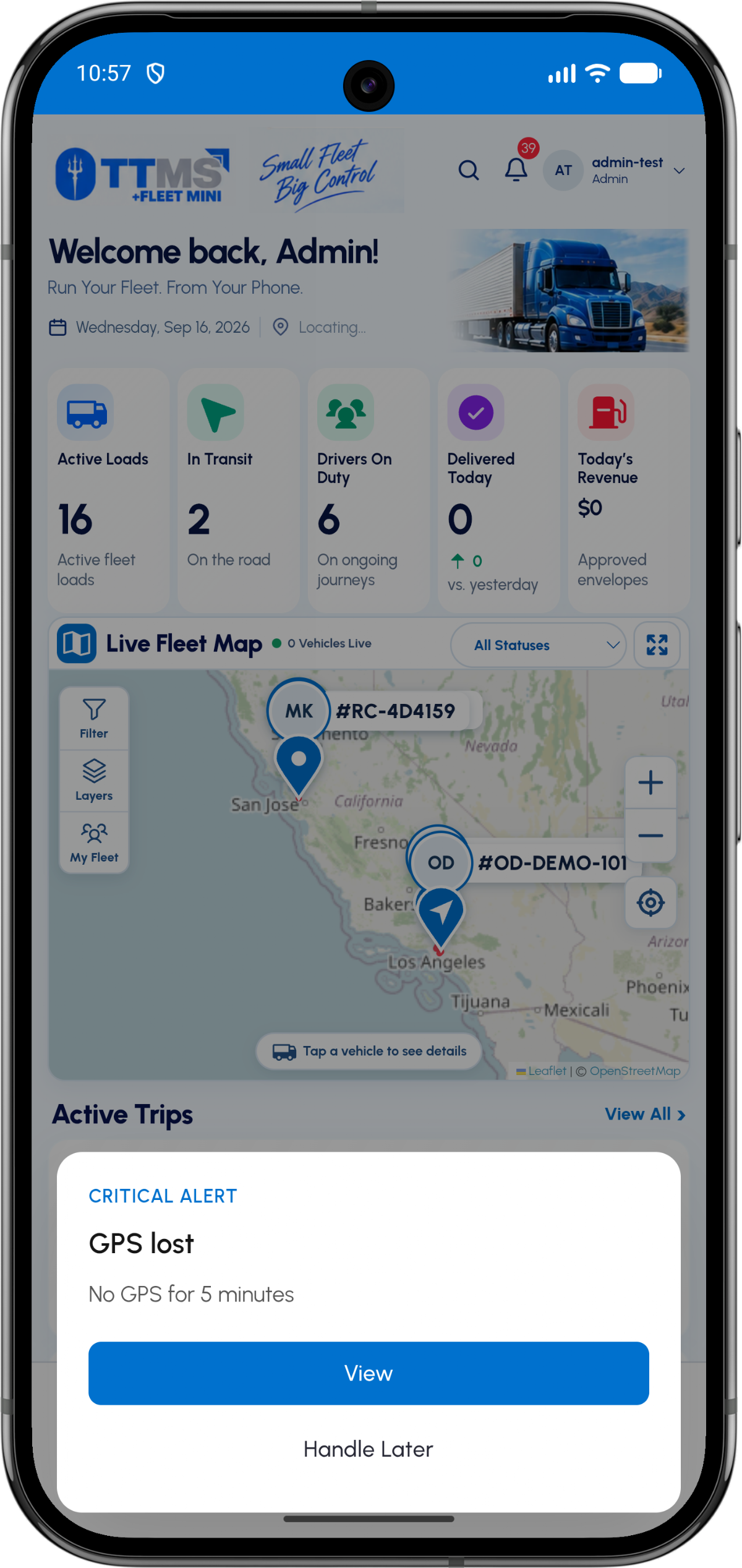
- Signal source
- Driver phone during an active trip
- Operational outputs
- Map, arrivals, progress and alerts
- Freshness
- Timestamped location updates
- Boundary
- Not a certified ELD substitute
Tracking begins with driver consent
Location access should be requested in context when the driver starts the trip. The app needs to explain why active and background location are used and respect the operating system permission state.
A denied permission or disabled service should produce a clear status rather than silently pretending that tracking is current.
Turn coordinates into operations
Raw latitude and longitude are less useful than an arrival, departure, route deviation or GPS-stale event. Geofences can help connect a location signal to a planned stop.
The backend should keep server timestamps and signal freshness so the owner can distinguish live data from an old point.
Use estimates honestly
Phone GPS can support mileage and motion estimates, but hardware, signal conditions, power settings and permissions affect accuracy. Present estimated values as estimates.
Compliance records that legally require certified ELD data should come through the appropriate ELD integration.
OPERATIONAL SEQUENCE
A workflow an owner and driver can both follow
The route ribbon makes the relationship between actions visible. Each step leaves context for the next person and the final review.
- 1Driver starts trip
- 2Location permission is confirmed
- 3Fresh points update the trip
- 4Geofence creates arrival context
- 5Owner receives stale-GPS alert if needed
QUESTIONS & ANSWERS
Questions fleets ask
Can Fleet Mini track a truck with only the driver phone?
It can use permitted phone location during an active trip for operational visibility, subject to device, signal and permission limits.
Does phone GPS replace an ELD?
No. Phone-derived tracking is an operational estimate. Certified hours-of-service records must come from compliant ELD hardware and services.
What is a GPS-lost alert?
It indicates that the system has not received a fresh expected location signal for a defined period, so the owner knows the map may be stale.
Can location trigger stop arrival?
A geofence can suggest arrival when a fresh point enters the stop boundary, with the event recorded for review.
Last reviewed: September 18, 2026. Product scope and terminology checked against the current mobile experience.